$289 Apart, But the Real Gap Is What Burns Inside Them
The Creality K1C lists at $549. The Elegoo Neptune 4 Pro regularly sells for $260. That $289 difference is real money — it’s another spool budget, a filament dryer, or most of a second printer. But the price gap is not the whole story, and if you buy the Neptune 4 Pro expecting to run carbon-fiber blends or ABS without modification, you’ll be disappointed before your second print.
Both machines run Klipper-based firmware. Both have dual-gear direct drive extruders. Both hit 20,000mm/s² acceleration on paper. The divergence is in architecture — CoreXY enclosed vs open-frame bedslinger — and in what that architecture lets you print reliably. That’s the axis this comparison is actually about.
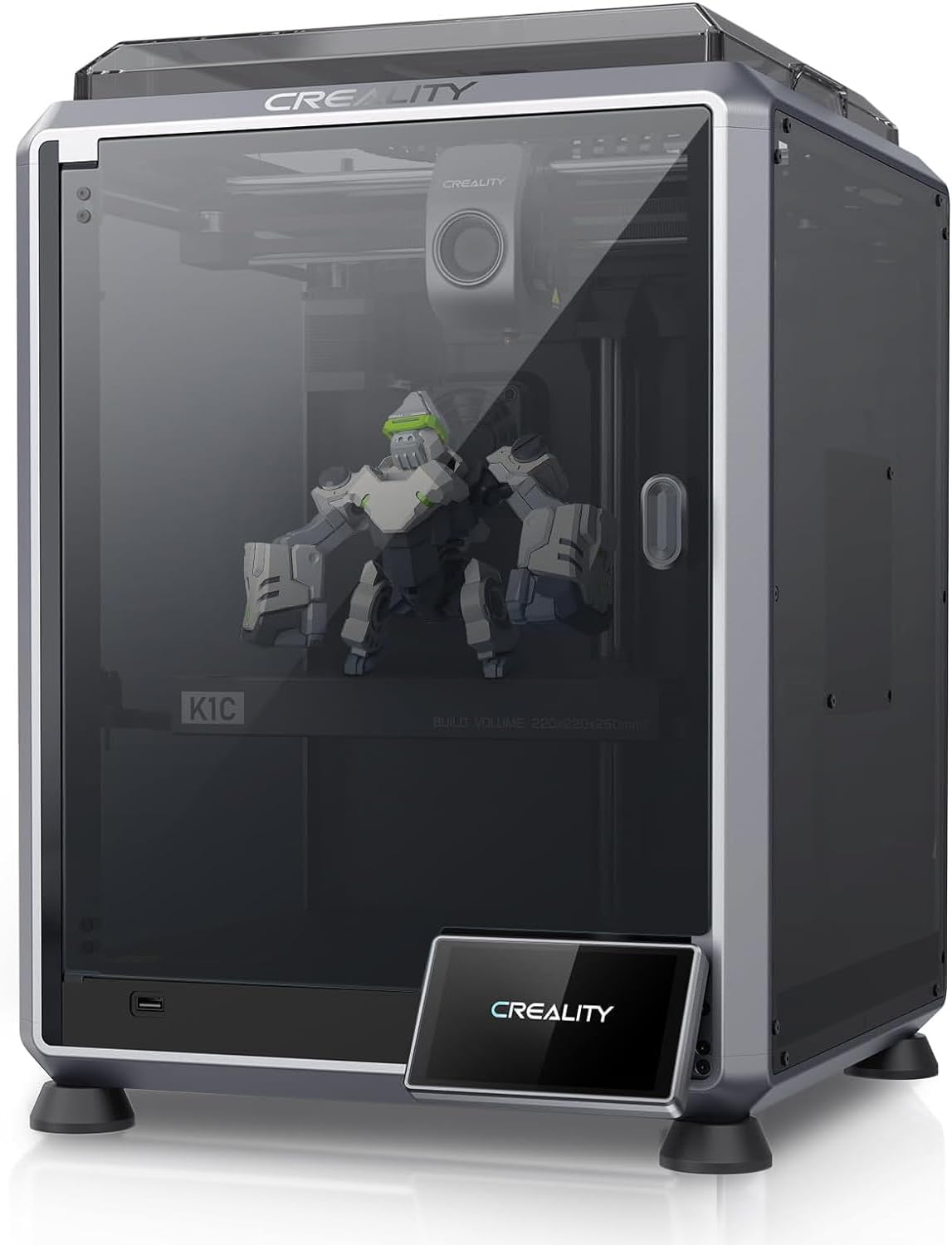
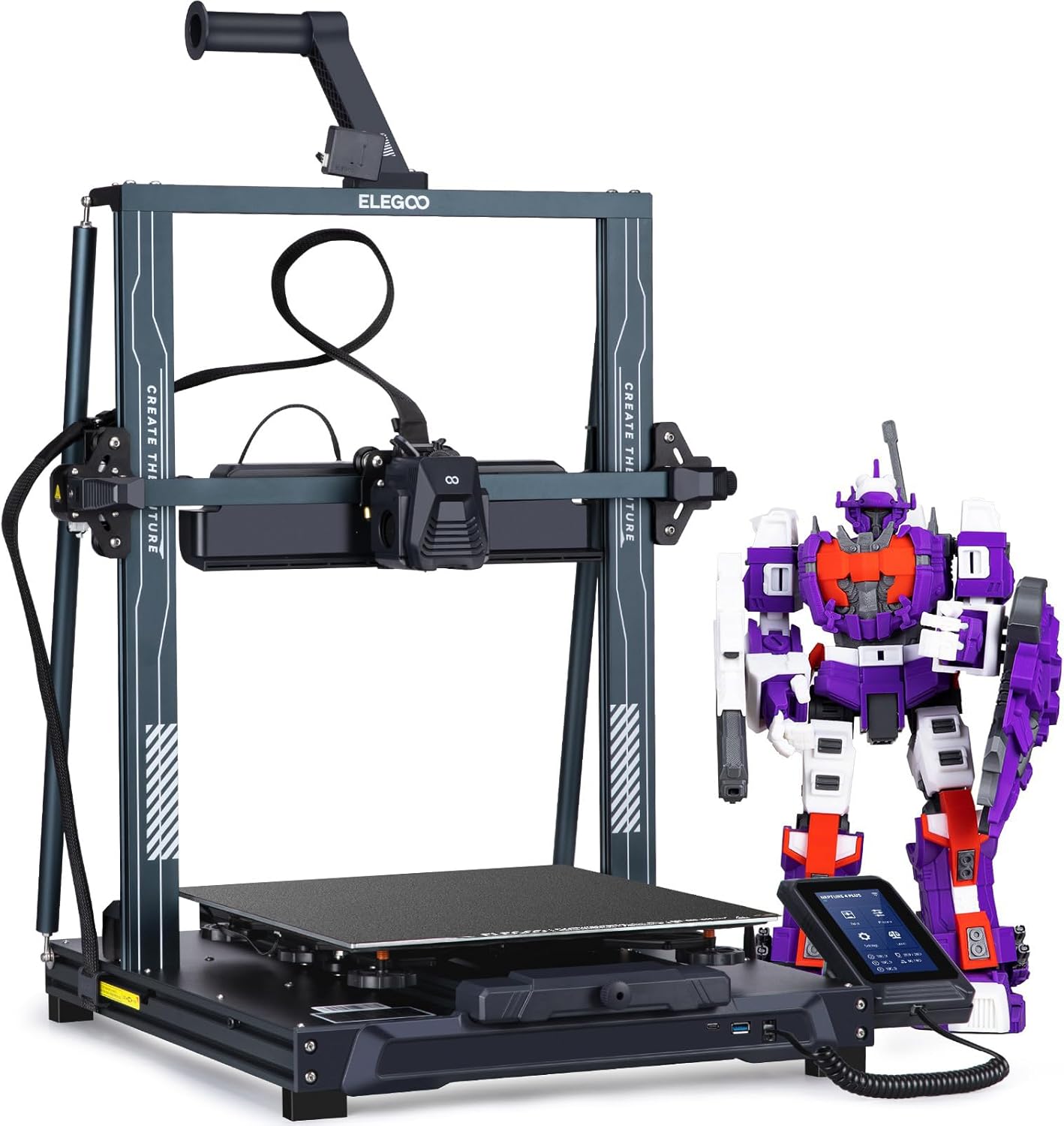
| Spec | Creality K1C | Elegoo Neptune 4 Pro |
|---|---|---|
| Build Volume | 220×220×250mm | 225×225×265mm |
| Kinematics | CoreXY | Bedslinger (Cartesian) |
| Max Speed | 600 mm/s | 500 mm/s |
| Max Nozzle Temp | 300°C | 300°C |
| Max Bed Temp | 100°C | 110°C |
| Extruder | All-metal dual-gear direct drive | Dual-gear direct drive |
| Leveling | Fully automatic | Automatic (121-point) |
| Chamber | Enclosed | Open |
| Firmware | Creality OS (Klipper-based, locked) | Klipper (Elegoo fork, locked) |
| Camera | Built-in (1080p AI camera) | Optional (sold separately) |
CoreXY vs Bedslinger: Why Kinematics Matter at Speed
The Neptune 4 Pro moves its print bed along the Y axis. At low speeds that’s fine. At 500mm/s with 20,000mm/s² acceleration, the bed is hauling a growing part back and forth with every travel move. That moving mass is the fundamental constraint of a bedslinger: the heavier the print, the more inertia you’re fighting, and the more ringing and ghosting show up on walls parallel to the Y axis.
The K1C moves only the toolhead. The bed stays stationary. At 600mm/s the toolhead whips across the gantry and the part on the bed doesn’t care — it’s not going anywhere. Input shaping helps both machines, and both have it, but CoreXY starts from a better mechanical position for high-speed quality.
For PLA benchmarks and smaller prints, the Neptune 4 Pro holds its own. For tall parts, dense infill, or anything where you’re pushing toward the top of its speed range, the K1C’s architecture produces cleaner results with less tuning.
The Neptune 4 Pro does have one bedslinger advantage: build volume. At 225×225×265mm it edges out the K1C’s 220×220×250mm in every dimension. Not a meaningful difference for most prints, but worth noting if you’re regularly printing large flat objects where bed movement is less of a liability.
Material Compatibility: The Hardened Nozzle Divide
This is where the two printers separate most sharply, and it’s worth being direct about it.
| Material | Neptune 4 Pro (Open) | K1C (Enclosed) |
|---|---|---|
| PLA / PLA+ | Perfect | Perfect |
| PETG | Great | Great |
| ABS | Limited | Great |
| ASA | Limited | Great |
| TPU | Good | Good |
| Carbon-fiber blends | Limited | Perfect |
The Neptune 4 Pro’s limitations on ABS and ASA aren’t a firmware problem or a hotend problem — both machines reach 300°C. The problem is the open frame. ABS and ASA need a stable, warm ambient temperature to avoid warping and cracking between layers. An open printer in a room-temperature workshop can’t provide that. The Neptune 4 Pro is rated limited for both, and that rating is accurate.
Carbon fiber is a separate issue. CF-filled filaments are abrasive enough that a standard brass nozzle degrades noticeably within a spool or two. The Neptune 4 Pro ships with a brass nozzle by default. You can buy a hardened-steel nozzle separately, but the stock configuration isn’t built for it. The K1C ships with the Unicorn nozzle — a tri-metal design with a copper body, titanium heat break, and hardened steel tip — rated perfect for CF blends from day one.
If your material list is PLA, PLA+, PETG, and occasional TPU, the Neptune 4 Pro handles all of it without compromise. If ABS, ASA, or any CF blend is on your list, the K1C is the only one of these two printers that’s actually set up for the job.
Firmware and Klipper Ecosystem
Both printers run locked Klipper forks, which is worth understanding before you buy either one expecting vanilla Klipper flexibility.
The K1C runs Creality OS, a Klipper-based system that Creality has modified and locked down. Input shaping and pressure advance are present and functional, but you’re working within Creality’s UI and update cadence. The community has developed rooting methods that open up more of the underlying Klipper config, but out of the box you’re in a managed environment.
The Neptune 4 Pro runs Elegoo’s Klipper fork, similarly locked. The 121-point automatic leveling mesh is genuinely more thorough than most competitors at this price — more sample points means a more accurate compensation map across the bed. The touchscreen UI is functional but generic; don’t expect the polish of a Bambu interface.
Neither printer gives you the full open Klipper experience of a self-built Voron or a printer with Moonraker and Mainsail running on a Pi. If that level of control matters to you, both will require community workarounds. If you just want input shaping and pressure advance working without building anything yourself, both deliver that out of the box.
One practical difference: the K1C ships with a built-in 1080p AI camera. The Neptune 4 Pro treats a camera as an optional add-on. Remote monitoring and AI failure detection are ready to go on the K1C; on the Neptune 4 Pro you’re buying extra hardware and configuring it yourself.
Enclosure: The Feature That Changes Everything
An enclosure isn’t just about keeping drafts off your print. It traps the heat the bed and hotend generate, raising the ambient chamber temperature passively. That’s what makes ABS and ASA printable without warping — not the nozzle temperature, but the environment the part cools in.
The K1C is enclosed. The Neptune 4 Pro is not.
For PLA, an enclosure is neutral to mildly negative — PLA benefits from active cooling, and a warm chamber can slow that down. The K1C manages this fine in practice. For everything above PETG on the engineering-material spectrum, the enclosure is the difference between reliable prints and a 40% failure rate.
If you’re thinking “I’ll just build a cardboard or IKEA enclosure around the Neptune 4 Pro,” that works, and people do it. But you’re adding cost, reducing accessibility, and potentially creating a fire hazard if you’re not careful about airflow and electronics. The K1C solves this at the factory.
The Buy Recommendation
Buy the Elegoo Neptune 4 Pro (~$260) if:
- Your material list is PLA, PLA+, PETG, and occasional flexible filaments
- You want real Klipper features — input shaping, pressure advance — at the lowest possible entry price
- Build volume matters and you want every millimeter of the 225×225×265mm envelope
- You’re comfortable sourcing a hardened nozzle and adding an enclosure later if your needs expand
- The $289 price difference is meaningful to your budget right now
Buy the Creality K1C (~$549) if:
- You want to print ABS, ASA, or any carbon-fiber blend without modification
- CoreXY motion quality at high speeds matters for your print types
- You want a built-in camera and AI monitoring out of the box
- You’d rather pay once for an enclosed, abrasive-ready machine than retrofit a cheaper one
- Speed ceiling matters — 600mm/s vs 500mm/s, with better high-speed quality from the CoreXY architecture
For most people printing PLA and PETG on a budget, the Neptune 4 Pro is the correct answer. The value rating of 5 on a 5-point scale reflects what it delivers at $260 — it’s a genuinely capable machine for the materials it handles well. But “most people” shifts the moment ABS or CF enters the conversation. If there’s any chance your material needs will expand into engineering filaments, the K1C is the printer you won’t have to replace or heavily modify in six months.
The Neptune 4 Pro is a great printer sold at the wrong price point for what some buyers expect it to do. The K1C costs more and earns it.
For a deeper view of the K1C against other enclosed CoreXY machines at this price, see Bambu Lab A1 vs Creality K1C .